

Frequently asked questions
Direct answers about model provenance, original image verification, billing, generation time, timeouts, concurrency, and integrations.
1. Are you really using 🎨 GPT Image and 🍌 Nano Banana? How can I verify this?
Yes. Download the original image file from your generation result and check its provenance using the provider's official tool:
- 🎨 GPT Image: Upload the image to OpenAI's official verification page and check for OpenAI provenance signals, including SynthID watermarks or C2PA Content Credentials.
- 🍌 Nano Banana: Sign in to Gemini, upload the image, and ask: "Was this image generated or edited by Google AI?" Gemini checks for Google's SynthID watermark. See Google's verification instructions.
SynthID is an invisible digital watermark embedded in image content. OpenAI and Google use it to mark generated content so their official tools can identify its origin.
A watermark may survive resizing, cropping, or compression. To check whether the image content has changed, also verify its C2PA Content Credentials.
2. Are your 🎨 GPT Image and 🍌 Nano Banana 2K/4K images upscaled? How can I verify this?
No. We deliver the original images returned by the model provider. We do not upscale, enlarge, or alter their image content after generation.
Verify the file you downloaded directly, before taking a screenshot, compressing it, or saving it through another app:
- 🎨 GPT Image: Upload the image to OpenAI's official verification page and review the C2PA Content Credentials result. Check that the issuer is OpenAI, the credential is valid, and it corresponds to the current image.
- 🍌 Nano Banana: Upload the image to Gemini and ask about its Content Credentials and editing history. If supported credentials are present, review Google's issuer information and the verification result.
Quick local check (GPT Image):
- Choose an image that passes C2PA verification on OpenAI's official page with OpenAI as the issuer. Keep the original file.
- Make a copy on your device, resize it in an image editor to change its pixel dimensions, and save it.
- Upload the resized copy and compare the C2PA results: the original passes verification, while the resized image can no longer pass the integrity check against the original credential.
Third-party upscaling tools cannot reissue OpenAI's original generation credential for a modified image. When the current image matches OpenAI's trusted original credential and passes validation, this establishes that the image content we delivered has not been upscaled or altered since OpenAI signed it.
GPT Image verification comparison
Original output
Generated with GPT Image
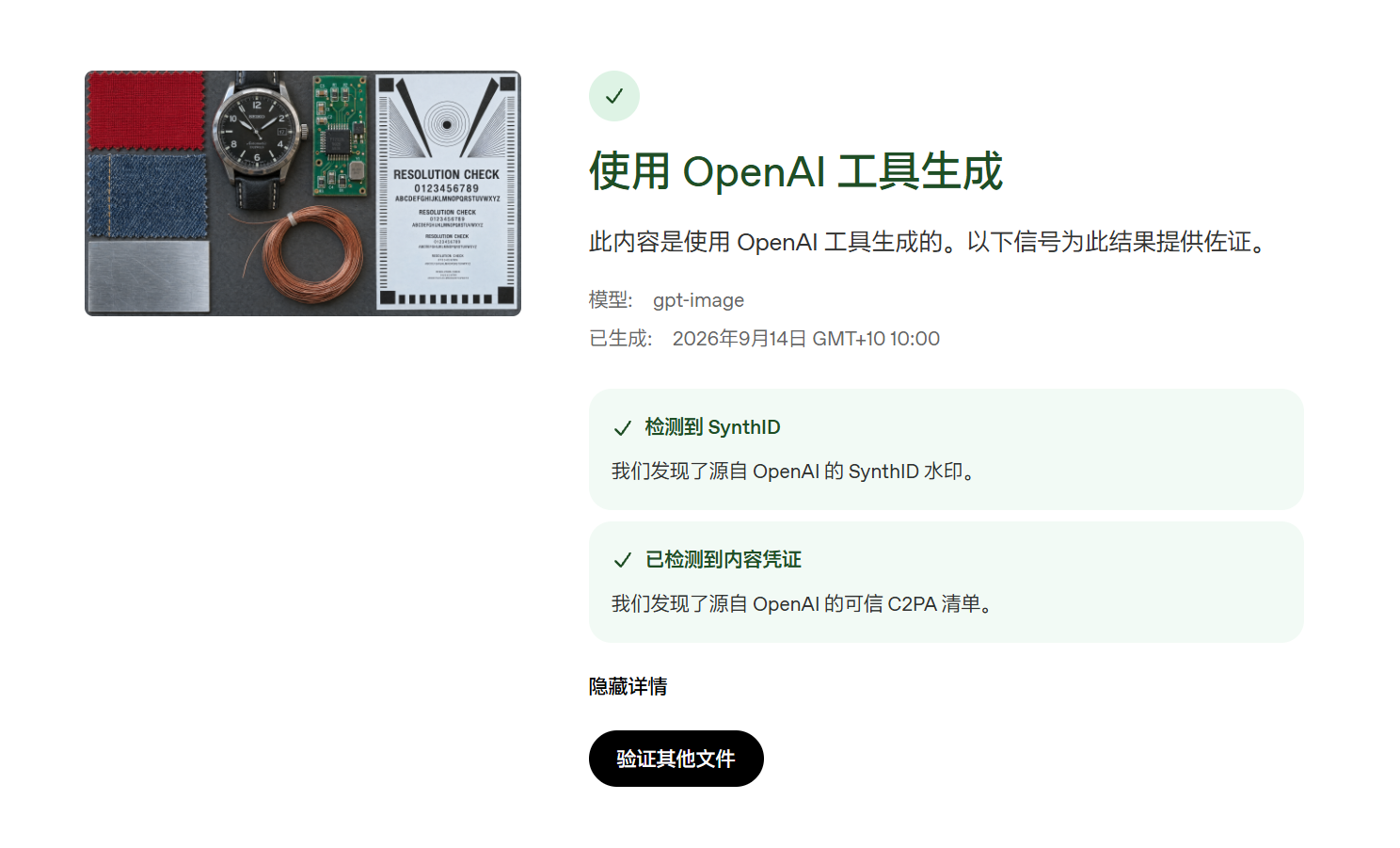
- SynthID
- Detected
- C2PA
- Trusted credentials detected
Upscaled example
Image processed with upscaling
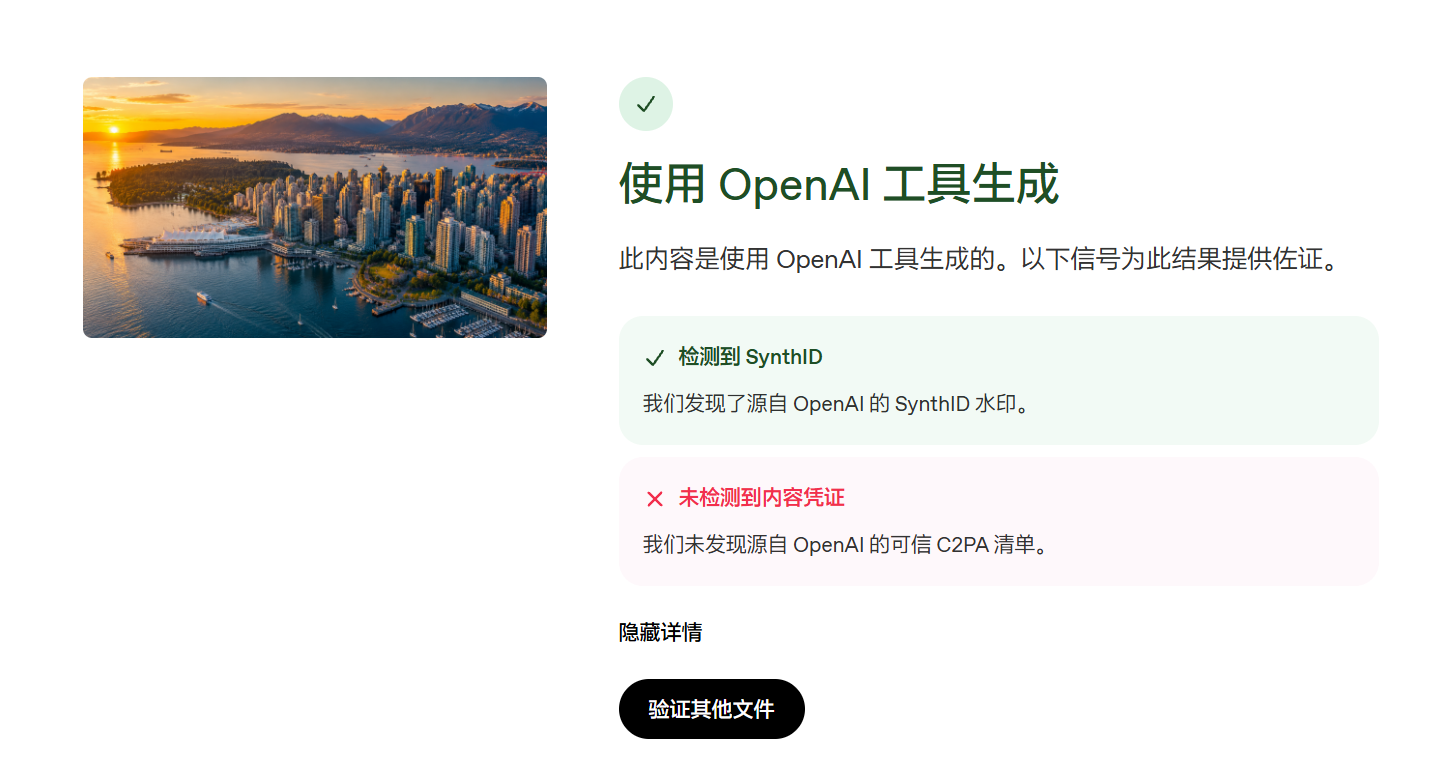
- SynthID
- Detected
- C2PA
- Trusted credentials not detected
Both results detect OpenAI SynthID watermarks. Trusted C2PA Content Credentials were also detected in the original output, but not in the upscaled example.
C2PA Content Credentials use digital signatures to record provenance and cryptographic hashes to bind credentials to image content. Verification checks the issuer, signature, and whether the current image matches the credential. Reissuing OpenAI's credentials requires its private signing key; copying or modifying credentials cannot forge a valid OpenAI signature.
Upscaling changes image pixels, so the modified image cannot pass the integrity check against the credential bound to the original image.
3. Can I be charged when no image was generated?
No. Billing requires successful generation with a parseable image. A charge means the server generated an image; receiving and saving it on your device is a separate step.
4. Why was I charged when my request failed?
A network interruption is the most common explanation: the server generated the image, but the connection dropped or the final download failed. An image delivery error does not necessarily mean generation failed.
Try a different network. For frequent timeouts, manually switch to the alternate Base URL, keeping the same path, key, and parameters.
https://api.1route.devFrequent timeouts? Use https://image-api.1route.dev5. How can I reduce timeouts and recover images after a disconnect?
Use Studio Unified. It is an asynchronous job protocol. An accepted submission returns a jobId, and generation continues if your waiting connection drops. Use the submitting key to follow the job through SSE or polling, then retrieve the completed image.
Save the jobId and resume the same job after reconnecting. Images and results are retained for 72 hours; download them before they expire.
You can also send an Idempotency-Key. The same API key, idempotency value, and request return the original job, including when the submission response was lost. Use a new idempotency value for each new task. Reusing a value for a different request returns 409.
6. Why do I keep getting 400 errors?
Read the error message first. A 400 can mean invalid parameters or an OpenAI content review rejection. When the message identifies a content or safety restriction, revise the prompt and reference images before submitting again.
Requests involving minors, graphic violence, sexual content, sensitive political content, or protected brands may trigger moderation or content similarity checks. Refer to OpenAI Content Policy and the actual error message.
Repeated content policy violations can result in an account or key ban. Parameter errors and content similarity warnings are distinct from confirmed content policy violations.
7. Can I connect my tool or plugin?
Usually. A tool that supports image generation through OpenAI Images or Google Gemini Native can connect using the correct Base URL, model name, and key for the model's group. Support for a chat API alone does not imply support for image generation.
Check Developer setup or let AI set it up.
8. How long does image generation take?
Image size and the number of reference images are the main factors. 1K usually takes 30 to 60 seconds. 2K and 4K often take longer, sometimes several minutes.
More reference images generally increase both waiting time and the risk of failure. The model, quality setting, and service load also affect duration. Keep only the references you need.
9. How much concurrency can you provide?
A single account can be configured for several hundred concurrent tasks. The current architecture supports up to 10,000 concurrent image tasks. Contact us separately for requirements in the thousands; your available limit depends on your account configuration.
10. Requests keep failing, even after repeated retries. What should I do?
Check your prompt, reference images, balance, and key group, then consult 🎨 GPT Image errors or 🍌 Nano Banana errors. Repeating a rejected prompt, an unpaid request, or invalid parameters usually will not help.
Widespread incidents and recovery updates are announced in the . Reliability depends largely on the image services operated by OpenAI, Google, and other model providers. When those services are healthy, the typical overall success rate is around 95%; the remaining failures also include insufficient balance and moderation rejections. This is a reference level, not a guarantee for an individual request.
For urgent work, you can switch to another image group using a key for that group. Check any accepted Studio job with its original key first to avoid duplicate generation.
11. Am I charged for moderation rejections or failures caused by my prompt or images?
No. If OpenAI or Nano Banana rejects the content, or the prompt, reference images, or parameters cause image generation to fail, the failed generation is not charged.
Repeated content policy violations can result in an account or key ban. Revise the content before trying again.